
Destroy a Vault Robots: Verified Robots, Labels, and How They Fight
Robots in Destroy a Vault: how rolling and Cash purchases work, the labels that set robots apart, and the robots documented in recorded gameplay. Not a complete roster.
In Destroy a Vault, robots are the units that do the damage. You roll for robots, buy the offers you can afford with Cash, and place them in slots around your vault, where they keep shooting until it breaks. The official Roblox description puts it in three lines: "🎲 Roll for rare robots!", "🤖 Build an army to attack your vault!", and — the part that matters while you're logged off — "your robots earn Gold while you're offline!"
One honest limit up front: there is no verified complete robot list for Destroy a Vault, so this is not a full roster. It is everything that can be confirmed right now: how robots are obtained, the labels that tell one robot from another, the specific robots seen in one recorded gameplay session, and how placed robots attack the vault.

What robots do in the game loop
Robots sit at the center of Destroy a Vault's loop. Per the official description, you roll for rare robots, build an army to attack your vault, upgrade your robots and expand your base, and unlock stronger vaults for bigger rewards — and your robots keep earning Gold the whole time you're offline. Game Rant summarizes the same cycle: "Rolling rare robots and sending them to smash a vault is the whole loop in Destroy a Vault."
How you get robots
Robots enter your collection through rolling. Each roll surfaces robot offers, and every offer carries the two details you weigh before deciding: a rarity label and a Cash price. Affordable offers can be purchased and equipped; anything above your budget gets skipped, and you roll on.
The recorded session shows both outcomes. The player identified an epic and bought it for 4 million Cash while holding about 14 million, and skipped a divine-label offer listed at 32 billion because, as he put it, "we don't have 32 bill." Early on, he also bought cheap commons just to get something placed. The trade-off is the one Game Rant names: "A rare robot is only useful once you can field it" — a great offer at a price you can't pay adds nothing to your army today.
The labels that tell robots apart
These are the observable details that separate one robot from another:
- Rarity tier — offers are labeled by rarity; the recorded session shows common, epic, legendary, and divine all in play.
- Cash price — prices scale with quality, from cheap commons up to a divine sitting at 32 billion.
- Damage per second — placed robots show a per-second reading; the player compared robots at "6,000 per second" and "7,000 again."
- Battery — robots run on a charge you have to manage: "you have to charge them."
- Attack behavior — at least one robot fights differently: an epic that "actually flies. It flies up. It shoots at them."
- Color coding — the player liked that the interface is color-coordinated, with "really light gray ones or shiny gray ones" marking spots where nothing is placed.
Robots can also be upgraded — damage and battery are both upgrade targets — but upgrade costs and procedures are a separate system not covered here. And the exact figures above are point-in-time readings from a single session, not a stable stat table: use the labels to compare robots in the moment rather than treating any number as fixed.
The robots documented in one session
One recorded session puts names — loose ones — to five robots. Treat these as the video creator's spoken descriptions, not an official in-game roster; only "sandstorm turret" comes close to a verbatim name. What the session does establish is how differently these robots fit an army:
- The sandstorm turret was claimed mid-session and instantly called "the best one we have ever had."
- A legendary tank was the workhorse — "our best tank, which is definitely that legendary" — and the player's pick to "spam upgrade" with his money.
- The flying epic attacked from above after being bought for 4 million.
- The divine offer stayed out of reach at 32 billion and was never fielded.
- Commons existed to fill slots and were deleted, one by one, as better robots arrived: "I want to get rid of all the commons."
| Robot observed | Label shown | What the recorded player did with it |
|---|---|---|
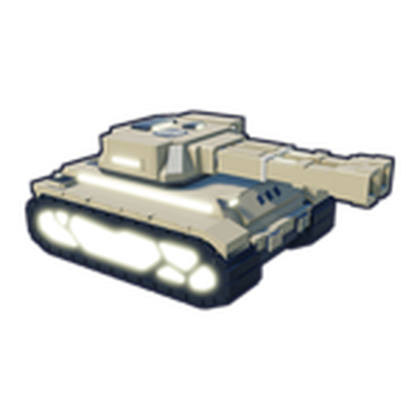 Sandstorm turret | Not stated | Claimed mid-session: "the best one we have ever had" |
| Unnamed tank | Legendary | Best placed damage-dealer; targeted for "spam" upgrading |
| Flying robot | Epic | Bought for 4 million; attacks from the air |
| Divine-tier offer | Divine | Listed at 32 billion; skipped as unaffordable |
| Commons | Common | Filled early slots; removed to free space |
Labels in the table are as spoken by the video creator, not an in-game roster readout.
How robots attack the vault
Robots don't fight on their own — they work through slots positioned around the vault. The recorded session walks through the full flow. First comes the slot itself: "you got to actually purchase a slot" before any robot can go down. Once placed, a robot continuously shoots the vault with its per-second damage shown, and filling slots is the straightforward way to scale up — "the more turrets or whatever you can put down, the better."
Placement isn't permanent. Robots can be removed and replaced at any time — "Delete, delete, delete... you just get rid of them" — which is exactly how the session cleared commons out for stronger robots. The shooting pays too: the player guessed "you get gold just every time they like shoot at this thing," and the official description confirms robots earn Gold while you're offline, though it doesn't state how much. He called going AFK "the number one thing you can do in this game to progress quickly," letting a full set of placed robots grind the vault down on their own.
This overview reflects Destroy a Vault as recorded on October 1, 2026, while the game's title carried an active "[WEATHER]" update prefix. Robots arrive through updates, so the roster can outgrow what's documented here at any time — recheck after a major update before assuming this is still the whole picture.
Related Guides
How to Roll Robots
What each spin costs in Cash, which rarities rolls can return, and why every robot still needs a bought slot.
How to Build a Robot Army
Buy placement slots, field your rolled robots, swap and upgrade them, and let the army break the vault automatically.
Robot Rarities Explained
What the Common, Epic, Legendary, and Divine labels mean, how colors mark them on your base, and what rarity changes.
How to Attack Vaults
Set up a vault attack step by step: buy attack slots, place robots, raise damage, and know when the encounter completes.